
Node-RED meets KNX
KNX ↔ MQTT - IoT (sample)
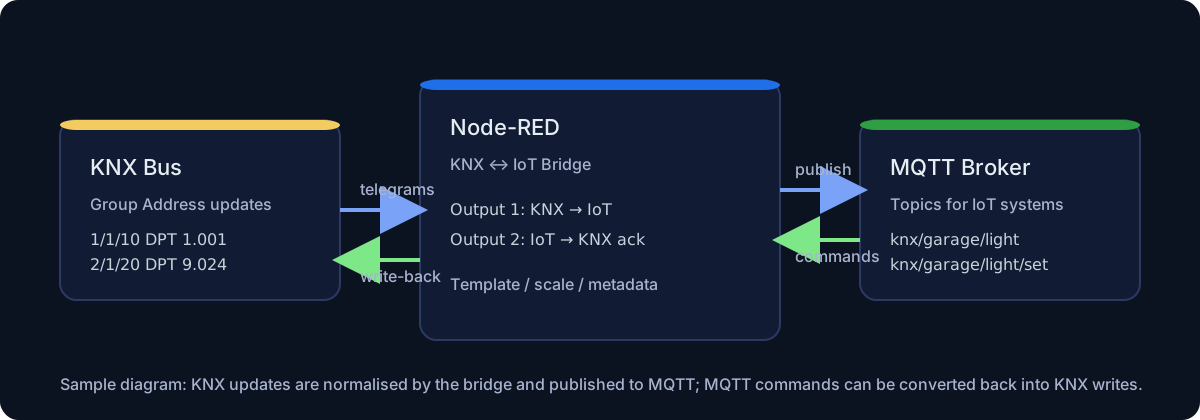
This sample shows how to use the KNX ↔ MQTT - IoT node to:
- publish KNX updates to an MQTT topic (Output 1)
- accept MQTT commands and write them back to KNX (Output 2 = write/ack)
For the full node reference see: MQTT - IoT configuration
KNX ↔ MQTT round-trip
Copy this code and paste it into your flow
View code
> Adjust the KNX Group Addresses/DPTs and the MQTT broker according to your setup. ```json [ { "id": "f2c6bd1f9d7b91b1", "type": "tab", "label": "KNX MQTT - IoT sample", "disabled": false, "info": "" }, { "id": "a1c1a1a02e1f3e43", "type": "comment", "z": "f2c6bd1f9d7b91b1", "name": "Edit the KNX gateway + MQTT broker config nodes at the bottom of this flow.", "info": "", "x": 320, "y": 60, "wires": [] }, { "id": "0a5b2c2d90d3f0a1", "type": "knxUltimateIoTBridge", "z": "f2c6bd1f9d7b91b1", "server": "7d3f7a4f6b7d3f7a", "name": "Bridge mappings", "outputtopic": "", "emitOnChangeOnly": true, "readOnDeploy": true, "acceptFlowInput": true, "mappings": [ { "id": "map-garage-light", "enabled": true, "label": "Garage light", "ga": "0/1/5", "dpt": "1.001", "direction": "bidirectional", "iotType": "mqtt", "target": "knx/garage/light", "method": "POST", "modbusFunction": "writeHoldingRegister", "scale": 1, "offset": 0, "template": "{{value}}", "property": "", "timeout": 0, "retry": 0 } ], "wires": [ [ "1f3a3a3d2c7a9a01", "c7f8b3c6b4a2f1e0" ], [ "8a9c0d1e2f3a4b5c" ] ] }, { "id": "b7b8c9d0e1f2a3b4", "type": "mqtt in", "z": "f2c6bd1f9d7b91b1", "name": "Command topic", "topic": "knx/garage/light/set", "qos": "1", "datatype": "auto", "broker": "d2c3b4a5f6e7d8c9", "nl": false, "rap": true, "rh": 0, "inputs": 0, "x": 160, "y": 160, "wires": [ [ "0a5b2c2d90d3f0a1" ] ] }, { "id": "1f3a3a3d2c7a9a01", "type": "mqtt out", "z": "f2c6bd1f9d7b91b1", "name": "Publish KNX updates", "topic": "", "qos": "", "retain": "", "respTopic": "", "contentType": "", "userProps": "", "correl": "", "expiry": "", "broker": "d2c3b4a5f6e7d8c9", "x": 610, "y": 140, "wires": [] }, { "id": "c7f8b3c6b4a2f1e0", "type": "debug", "z": "f2c6bd1f9d7b91b1", "name": "Output 1 (KNX → IoT)", "active": true, "tosidebar": true, "console": false, "tostatus": false, "complete": "true", "targetType": "full", "x": 620, "y": 200, "wires": [] }, { "id": "8a9c0d1e2f3a4b5c", "type": "debug", "z": "f2c6bd1f9d7b91b1", "name": "Output 2 (IoT → KNX ack)", "active": true, "tosidebar": true, "console": false, "tostatus": false, "complete": "true", "targetType": "full", "x": 630, "y": 260, "wires": [] }, { "id": "7d3f7a4f6b7d3f7a", "type": "knxUltimate-config", "host": "224.0.23.12", "port": 3671, "physAddr": "15.15.22", "hostProtocol": "Auto", "suppressACKRequest": false, "csv": "", "KNXEthInterface": "Auto", "KNXEthInterfaceManuallyInput": "", "stopETSImportIfNoDatapoint": "fake", "loglevel": "error", "name": "KNX Gateway", "delaybetweentelegrams": 25, "ignoreTelegramsWithRepeatedFlag": false, "keyringFileXML": "", "knxSecureSelected": false, "secureCredentialsMode": "keyring", "tunnelIASelection": "Auto", "tunnelIA": "", "tunnelInterfaceIndividualAddress": "", "tunnelUserPassword": "", "tunnelUserId": "", "autoReconnect": "yes", "statusUpdateThrottle": "0", "statusDateTimeFormat": "legacy", "statusDateTimeCustom": "" }, { "id": "d2c3b4a5f6e7d8c9", "type": "mqtt-broker", "name": "MQTT broker", "broker": "127.0.0.1", "port": "1883", "clientid": "", "autoConnect": true, "usetls": false, "protocolVersion": "4", "keepalive": "60", "cleansession": true, "autoUnsubscribe": true, "birthTopic": "", "birthQos": "0", "birthPayload": "", "birthMsg": {}, "closeTopic": "", "closeQos": "0", "closePayload": "", "closeMsg": {}, "willTopic": "", "willQos": "0", "willPayload": "", "willMsg": {}, "userProps": "", "sessionExpiry": "" } ] ```How to test quickly
- Deploy the flow.
- Toggle the KNX GA
0/1/5(ETS, button, etc) and check the Debug panel: Output 1 publishesmsg.topic=knx/garage/light. - Publish
true/false(oron/off) toknx/garage/light/setand check Output 2 for the write/ack details.