
Node-RED meets KNX
KNX AI (sample)
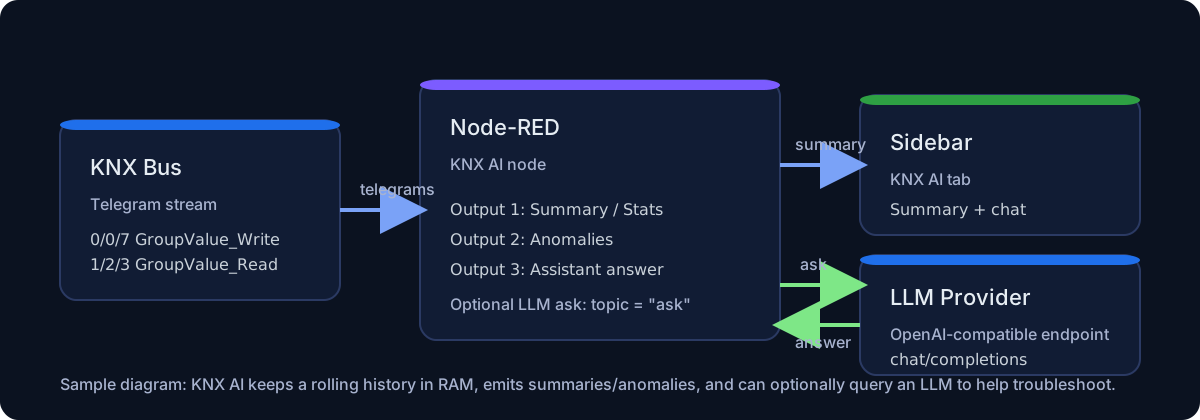
This sample shows how to use KNX AI to:
- capture telegrams from a selected
knxUltimate-config - generate a traffic summary on demand or periodically
- send an
askcommand (LLM optional)
For the full node reference see: KNX AI
Summary + anomalies + ask
Copy this code and paste it into your flow
View code
> Edit the `knxUltimate-config` node at the bottom of the flow. ```json [ { "id": "tab_knx_ai_sample", "type": "tab", "label": "KNX AI sample", "disabled": false, "info": "" }, { "id": "cmt_knx_ai_1", "type": "comment", "z": "tab_knx_ai_sample", "name": "Edit the KNX gateway config node at the bottom of this flow.", "info": "", "x": 330, "y": 40, "wires": [] }, { "id": "inj_knx_ai_summary", "type": "inject", "z": "tab_knx_ai_sample", "name": "Summary now", "props": [ { "p": "topic", "vt": "str" } ], "topic": "summary", "once": false, "onceDelay": 0.1, "x": 140, "y": 140, "wires": [ [ "node_knx_ai" ] ] }, { "id": "inj_knx_ai_summary_auto", "type": "inject", "z": "tab_knx_ai_sample", "name": "Summary every 60s", "props": [ { "p": "topic", "vt": "str" } ], "topic": "summary", "repeat": "60", "crontab": "", "once": false, "onceDelay": 0.1, "x": 150, "y": 180, "wires": [ [ "node_knx_ai" ] ] }, { "id": "inj_knx_ai_reset", "type": "inject", "z": "tab_knx_ai_sample", "name": "Reset history", "props": [ { "p": "topic", "vt": "str" } ], "topic": "reset", "once": false, "onceDelay": 0.1, "x": 140, "y": 220, "wires": [ [ "node_knx_ai" ] ] }, { "id": "inj_knx_ai_ask", "type": "inject", "z": "tab_knx_ai_sample", "name": "Ask (payload=question)", "props": [ { "p": "payload", "vt": "str" }, { "p": "topic", "vt": "str" } ], "topic": "ask", "payload": "Quali sono i GA più attivi? Ci sono anomalie evidenti?", "payloadType": "str", "once": false, "onceDelay": 0.1, "x": 170, "y": 260, "wires": [ [ "fn_knx_ai_prompt" ] ] }, { "id": "fn_knx_ai_prompt", "type": "function", "z": "tab_knx_ai_sample", "name": "Set msg.prompt", "func": "msg.prompt = (typeof msg.payload === 'string') ? msg.payload : JSON.stringify(msg.payload);\\nreturn msg;", "outputs": 1, "noerr": 0, "initialize": "", "finalize": "", "x": 360, "y": 260, "wires": [ [ "node_knx_ai" ] ] }, { "id": "node_knx_ai", "type": "knxUltimateAI", "z": "tab_knx_ai_sample", "server": "cfg_knx_ai_1", "name": "KNX AI", "topic": "knx-ai", "notifywrite": true, "notifyresponse": true, "notifyreadrequest": true, "analysisWindowSec": "60", "historyWindowSec": "300", "maxEvents": "5000", "emitIntervalSec": "0", "topN": "10", "enablePattern": true, "patternMaxLagMs": "1500", "patternMinCount": "8", "rateWindowSec": "10", "maxTelegramPerSecOverall": "0", "maxTelegramPerSecPerGA": "0", "flapWindowSec": "30", "flapMaxChanges": "0", "llmEnabled": false, "llmProvider": "openai_compat", "llmBaseUrl": "https://api.openai.com/v1/chat/completions", "llmModel": "gpt-4o-mini", "llmSystemPrompt": "You are a KNX building automation assistant. Analyze KNX bus traffic and provide actionable insights.", "llmIncludeRaw": false, "x": 560, "y": 200, "wires": [ [ "dbg_knx_ai_summary" ], [ "dbg_knx_ai_anom" ], [ "dbg_knx_ai_answer" ] ] }, { "id": "dbg_knx_ai_summary", "type": "debug", "z": "tab_knx_ai_sample", "name": "Summary/Stats", "active": true, "tosidebar": true, "console": false, "tostatus": false, "complete": "payload", "targetType": "msg", "x": 760, "y": 160, "wires": [] }, { "id": "dbg_knx_ai_anom", "type": "debug", "z": "tab_knx_ai_sample", "name": "Anomalies", "active": true, "tosidebar": true, "console": false, "tostatus": false, "complete": "payload", "targetType": "msg", "x": 750, "y": 200, "wires": [] }, { "id": "dbg_knx_ai_answer", "type": "debug", "z": "tab_knx_ai_sample", "name": "AI answer", "active": true, "tosidebar": true, "console": false, "tostatus": false, "complete": "payload", "targetType": "msg", "x": 750, "y": 240, "wires": [] }, { "id": "cfg_knx_ai_1", "type": "knxUltimate-config", "z": "", "host": "224.0.23.12", "port": "3671", "physAddr": "15.15.200", "suppressACKRequest": false, "csv": "", "KNXEthInterface": "Auto", "KNXEthInterfaceManuallyInput": "", "autoReconnect": "yes" } ] ```Notes
- If you enable the LLM, bus data will be sent to the configured endpoint.
- For OpenAI, paste only the API key (starts with
sk-) in the node credentials.